

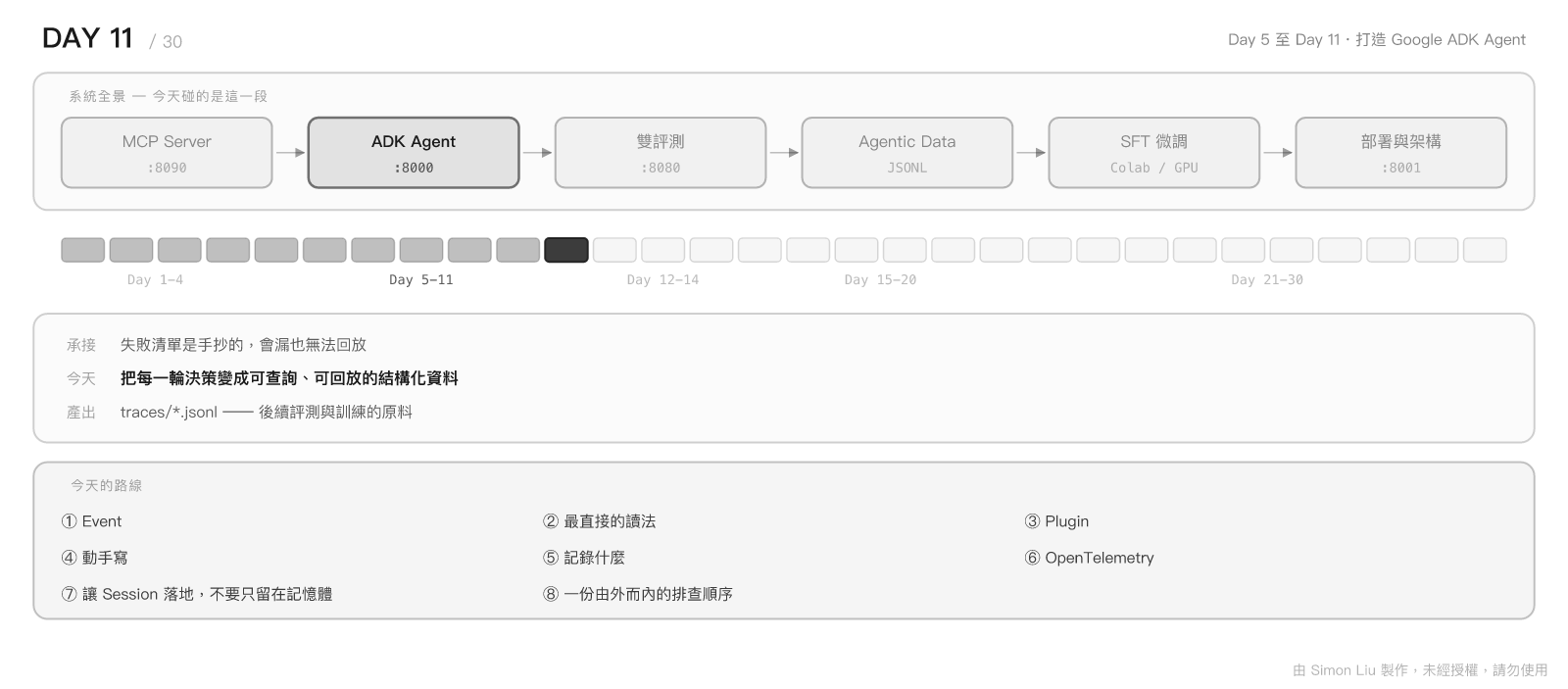
寫傳統程式時,遇到問題的處理方式相當直覺:下個中斷點、單步執行、看變數。因為程式的每一步都是我們自己寫的,行為是確定的。
Agent 不是這樣。它的每一次決策都是模型讀完上下文之後動態生成的,同一句話跑十次可能有三種結果。當它突然叫錯工具、參數填錯、或者陷入來回重試的迴圈時,斷點幫不上忙 —— 因為出問題的不是某一行程式碼,而是「模型當下看到了什麼、然後決定了什麼」。
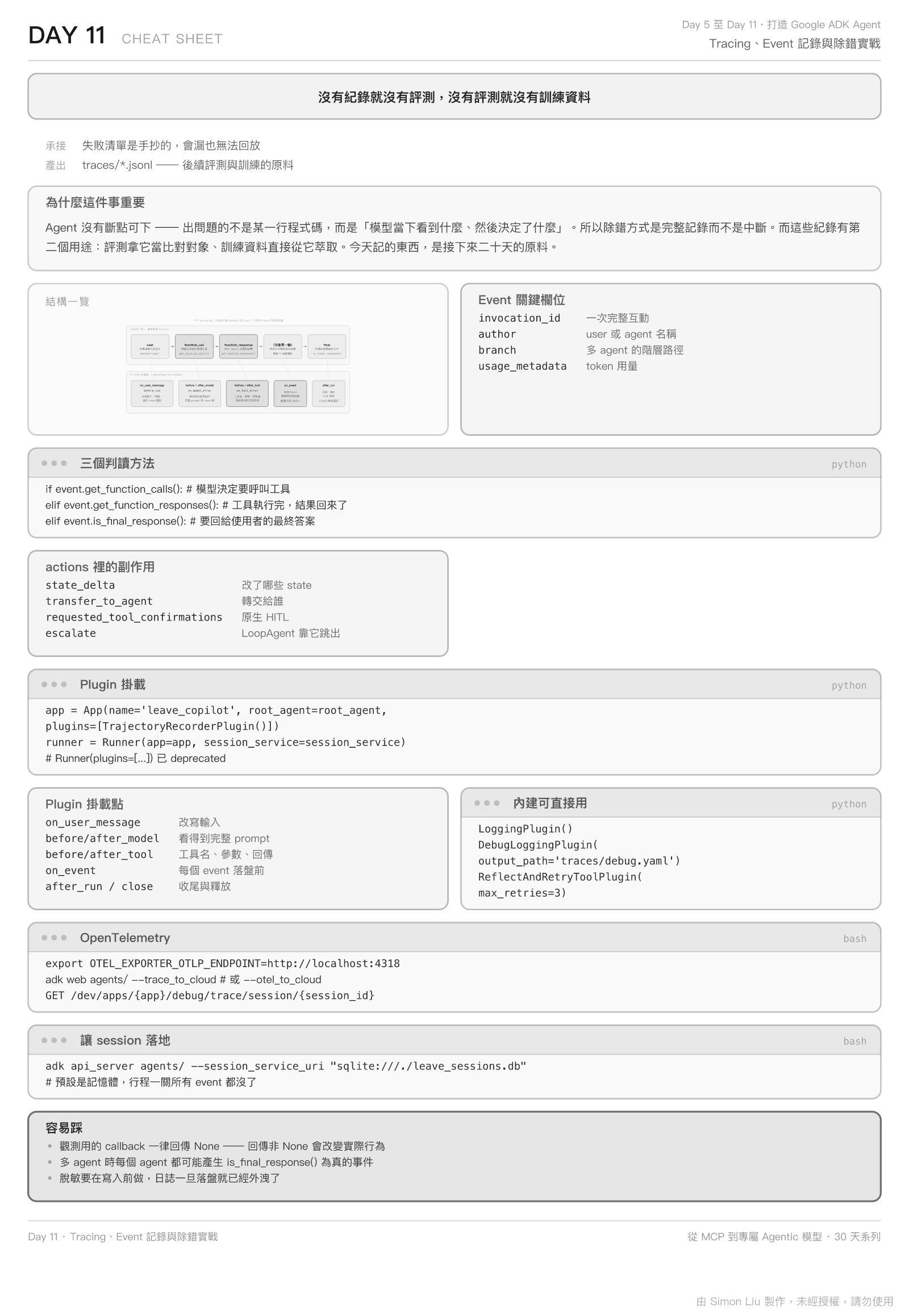
所以 Agent 的除錯方式是不同的:不是中斷它,而是完整記錄它。
而這件事有第二個目的。Day 6 曾經提過一句:「從今天起,每次測試都把 Event Stream 保存下來。」今天要把那句話兌現成一套可以長期運作的機制 —— 因為評測階段拿它當比對對象,訓練資料階段的素材直接從它萃取。
今天記錄的東西,就是接下來二十天的原料。
以下的內容,將會說明 Event 的結構與判讀方式、用 Plugin 攔截事件流的正確做法、一份為訓練資料階段設計的紀錄格式,以及 OpenTelemetry 這一層跨行程的觀測能力。
Google ADK 裡沒有「事件類型」這種東西 —— 沒有 ToolCallEvent、也沒有 AgentResponseEvent。只有一個 Event 類別,它繼承自 LlmResponse,靠內容判斷自己是什麼。
理解這一點很重要,因為它決定了解析程式該怎麼寫。
from google.adk.events import Event
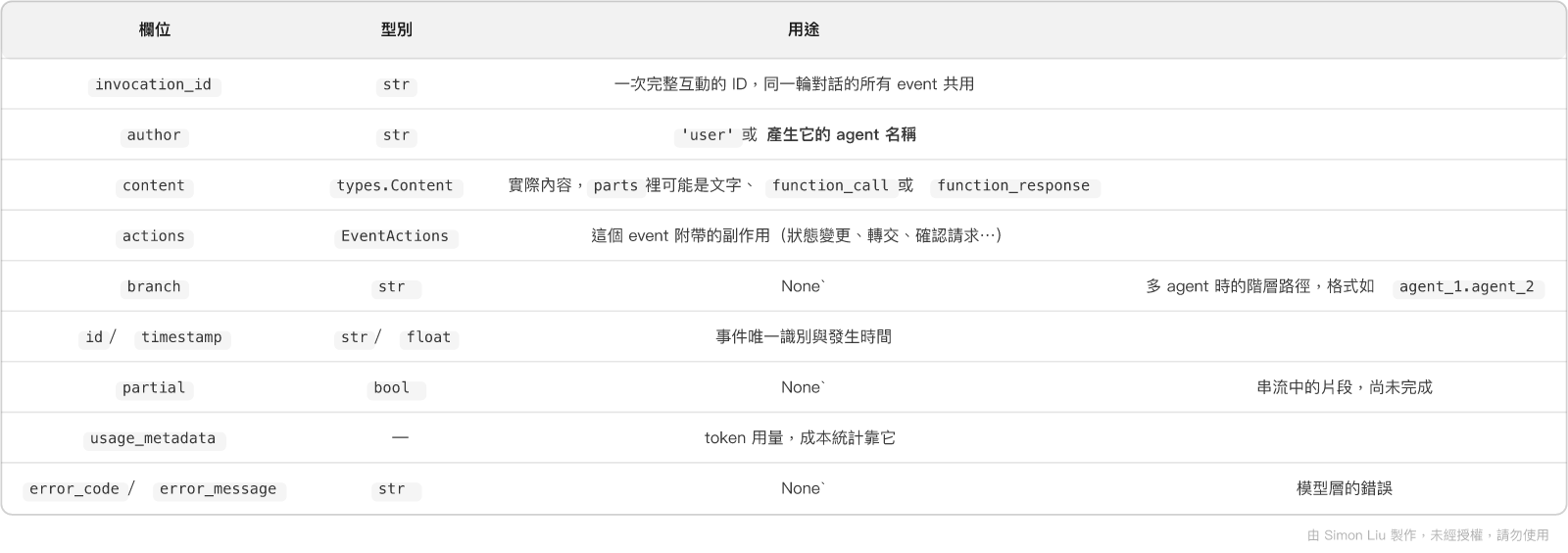
author 這個欄位在 Day 10 的雙 Agent 架構下特別有用 —— 它直接告訴您這個決定是查詢 Agent 做的,還是執行 Agent 做的。
event.get_function_calls()       # -> list[types.FunctionCall]
event.get_function_responses()   # -> list[types.FunctionResponse]
event.is_final_response()        # -> bool
這三個方法就是解析 event stream 的全部工具。判斷邏輯很單純:
if event.get_function_calls():
    # 模型決定要呼叫工具了
    for fc in event.get_function_calls():
        print(fc.name, fc.args)
elif event.get_function_responses():
    # 工具執行完,結果回來了
    for fr in event.get_function_responses():
        print(fr.name, fr.response)
elif event.is_final_response():
    # 這是要回給使用者的最終答案
    print(event.content.parts[0].text)
is_final_response()不是「有文字就是最終回應」。 它的實際判斷是:沒有 function call、沒有 function response、不是 partial、也沒有 trailing code execution result。此外若actions.skip_summarization或long_running_tool_ids有值,會直接回傳True。多 agent 情境下,每個參與的 agent 都可能各自產生一個is_final_response()為真的事件,這是解析時容易誤判的地方。
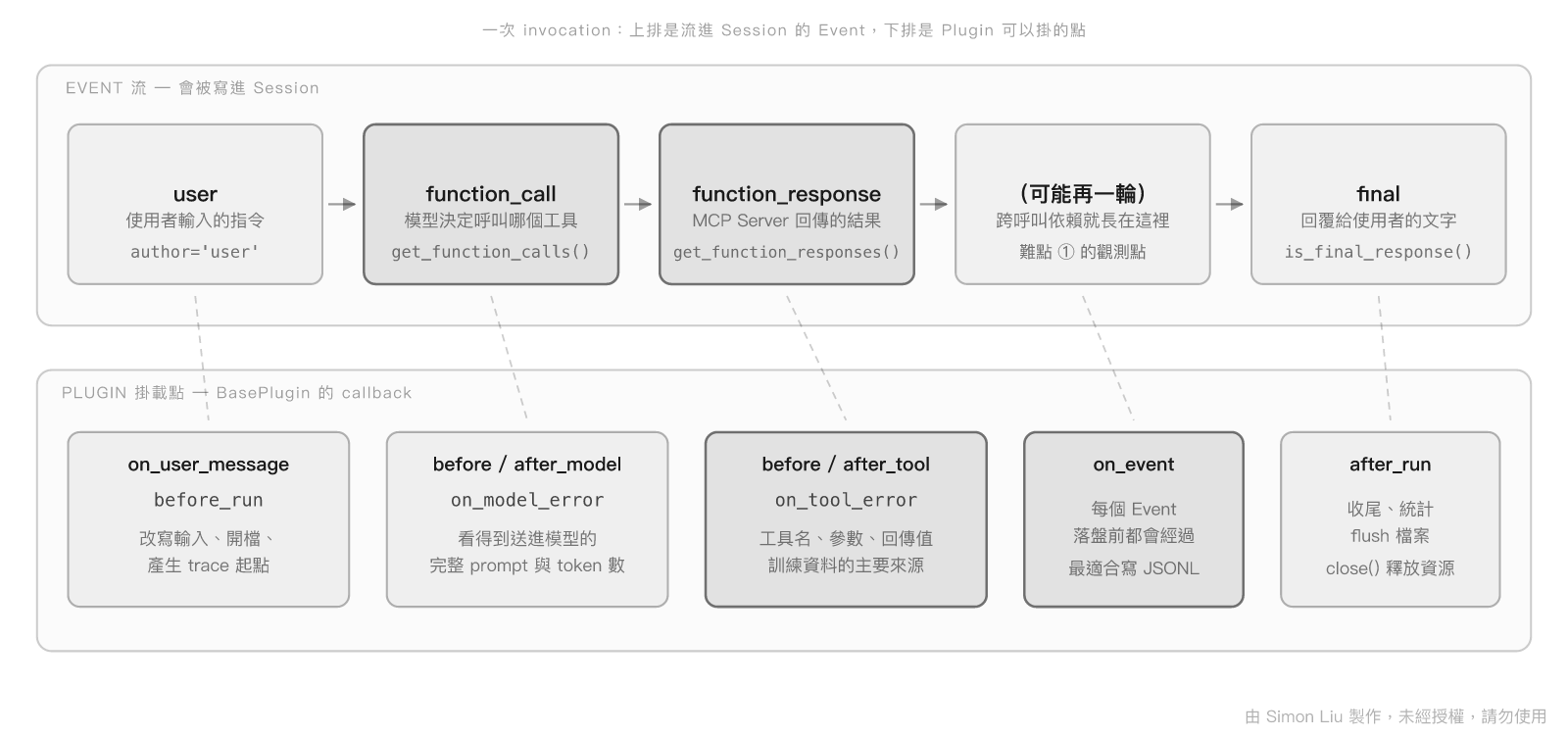
以「把我那張家庭旅遊的特休送出審核」為例,一次成功的執行會依序產生:
1. author='user'            content: 使用者的原始指令
2. author='leave_copilot'     content: function_call(search_leaves, {...})
3. author='leave_copilot'     content: function_response(search_leaves, {...})
4. author='leave_copilot'     content: function_call(update_leave_status, {...})
5. author='leave_copilot'     content: function_response(update_leave_status, {...})
6. author='leave_copilot'     content: "已將 LV-7f3a91 送出審核"
難點 ① 的觀測點就在這裡。 如果第 2、3 步不見了、直接從 update_leave_status 開始,那就是模型捏造了 ID。這個判斷不需要理解語意,只要看 event 序列就成立 —— 這也是評測階段能夠自動化評測的基礎。
EventActions 記錄的是「這個 event 造成了什麼改變」,其中幾個值得特別注意:
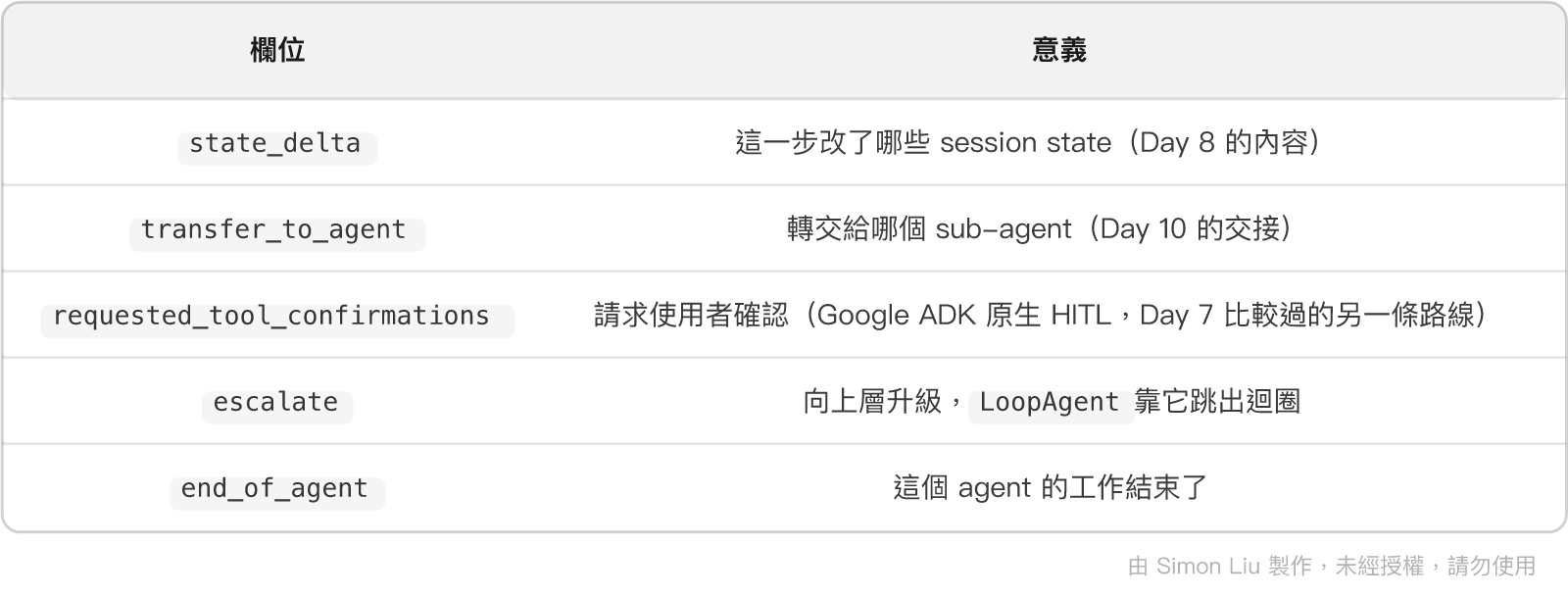
除錯多 Agent 系統時,transfer_to_agent 與 branch 這兩個欄位幾乎是唯一能還原「究竟是誰做了這個決定」的線索。
Runner.run_async() 回傳的是一個 AsyncGenerator[Event, None] —— 換句話說,事件流本來就是攤開在您面前的:
from google.adk.runners import Runner
from google.adk.apps import App
from google.adk.sessions import InMemorySessionService
from google.genai import types

app = App(name="leave_copilot", root_agent=root_agent)
runner = Runner(app=app, session_service=InMemorySessionService())

async for event in runner.run_async(
    user_id="simon",
    session_id=session.id,
    new_message=types.Content(
        role="user",
        parts=[types.Part(text="把我那張家庭旅遊的特休送出審核")],
    ),
):
    if calls := event.get_function_calls():
        for fc in calls:
            print(f"→ {fc.name}({fc.args})")
    elif event.is_final_response():
        print(f"✓ {event.content.parts[0].text}")
寫個小腳本印出來,多數的「它到底在幹嘛」都能當場看懂。
但這個做法有個限制:記錄邏輯與執行邏輯混在一起了。等到需要同時支援 adk web、adk api_server 與自己的腳本時,這段程式碼就得複製三份。
Google ADK 為此提供了 Plugin 機制。它是應用層級的攔截器 —— 掛一次,整個 App 底下所有 agent 的所有執行都會經過。
BasePlugin 提供的 callback 覆蓋了整個生命週期:
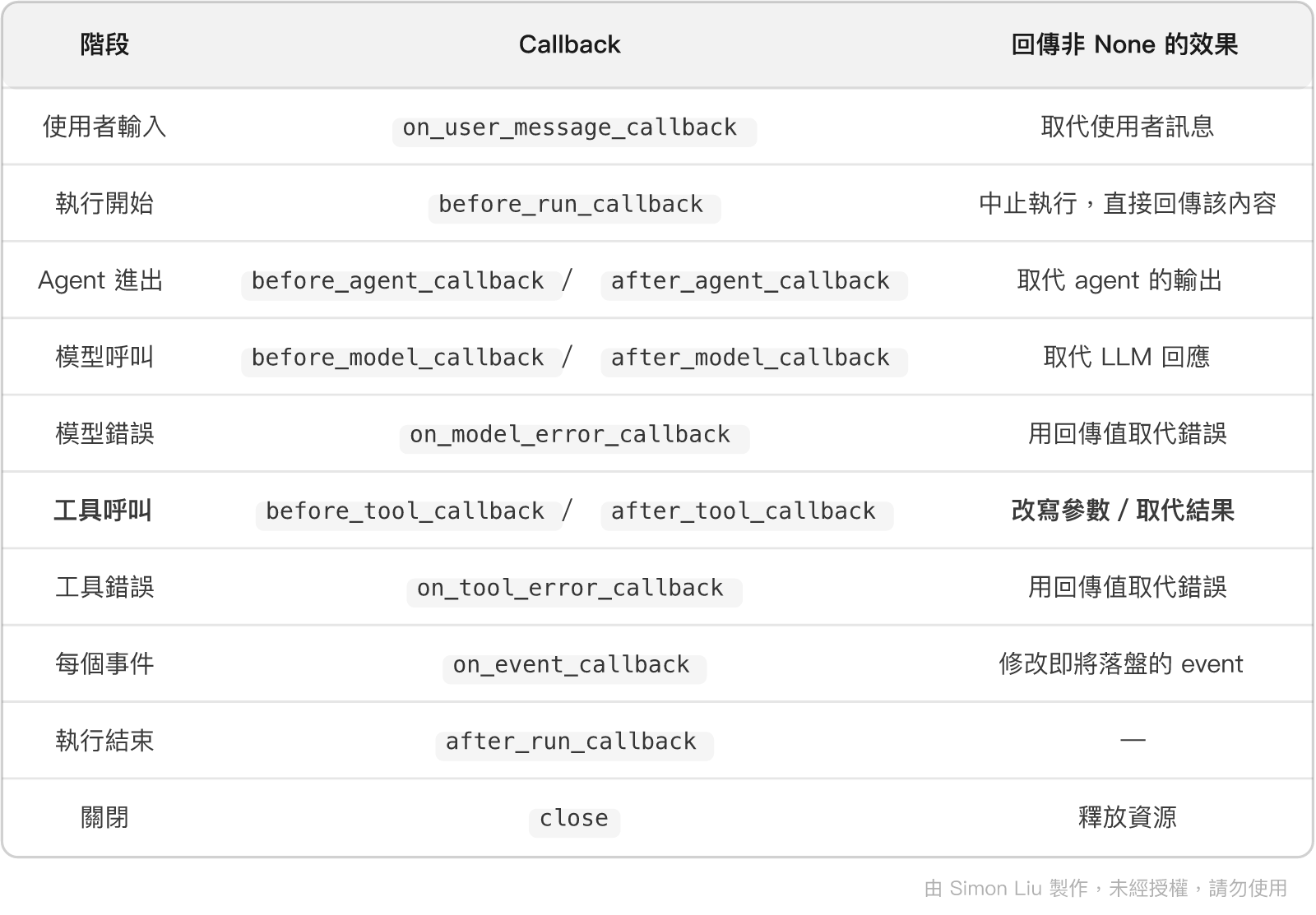
注意這些 callback 的回傳值不只是「觀測」。
before_tool_callback回傳 dict 會直接跳過工具執行、after_tool_callback回傳 dict 會取代工具結果。這代表 Plugin 不只能看,還能改 —— 這一點在系列後期談生產防禦時會再用到,但今天要先克制:觀測用的 Plugin 一律回傳None,否則您記錄的行為與實際行為會不一致。
from google.adk.apps import App
from google.adk.runners import Runner

app = App(
    name="leave_copilot",
    root_agent=root_agent,
    plugins=[TrajectoryRecorderPlugin(out_dir="traces/")],
)

runner = Runner(app=app, session_service=session_service)
Runner(plugins=[...]) 已經標記為 deprecated。 原始碼裡寫得很明白:
plugins: Deprecated. A list of plugins for the runner.
         Please use the `app` argument to provide plugins instead.
而且傳了 app 又傳 plugins 會直接拋錯。網路上不少範例還停在舊寫法,照抄會拿到 deprecation warning。
在自己動手寫之前,Google ADK 已經內建了兩個能直接用的:
from google.adk.plugins import LoggingPlugin, DebugLoggingPlugin

# 1. 全部印到終端機——最快看到發生什麼事
app = App(name="leave_copilot", root_agent=root_agent, plugins=[LoggingPlugin()])

# 2. 完整資訊寫成 YAML——適合存檔或貼給別人看
app = App(
    name="leave_copilot",
    root_agent=root_agent,
    plugins=[DebugLoggingPlugin(output_path="traces/adk_debug.yaml")],
)
DebugLoggingPlugin 記錄的內容相當完整:LLM request(含 system instruction、contents、tools)、LLM response、function call 與參數、function response、runner 產出的 event,以及每次 invocation 結束時的 session state。輸出格式是 YAML,每個 invocation 一份文件、以 --- 分隔。
遇到「它為什麼這樣選」的問題時,先開這個。 多數時候答案就在 system instruction 或 tools schema 裡,而那正是這個 plugin 會完整印出來的部分。
ReflectAndRetryToolPlugin 值得知道一下 —— 它會攔截工具失敗、把結構化的錯誤說明回饋給模型、並在上限內重試:
from google.adk.plugins import ReflectAndRetryToolPlugin

app = App(
    name="leave_copilot",
    root_agent=root_agent,
    plugins=[ReflectAndRetryToolPlugin(max_retries=3)],
)
這正是 Day 9 談自我修正時的機制,只是用 Plugin 的形式提供,而且處理了併發安全與「單一工具成功即重置該工具計數」這類細節。
內建的 plugin 適合除錯,但不適合當訓練資料的來源 —— YAML 不好逐筆處理、也沒有我們想要的欄位。所以要自己寫一個。
import json
import re
from datetime import datetime, timezone
from pathlib import Path
from typing import Any, Optional

from google.adk.events import Event
from google.adk.plugins import BasePlugin
from google.adk.tools import BaseTool

# 脫敏:token、密碼、私鑰在寫入前就要處理掉
_REDACT = [
    (re.compile(r"(?i)(bearer\s+)[A-Za-z0-9._\-]{16,}"), r"\1<REDACTED>"),
    (re.compile(r"(?i)(\"?(password|api_key|token)\"?\s*[:=]\s*\"?)[^\"\s,}]+"),
     r"\1<REDACTED>"),
]


def scrub(text: str) -> str:
    for pattern, repl in _REDACT:
        text = pattern.sub(repl, text)
    return text


class TrajectoryRecorderPlugin(BasePlugin):
    """把每一次 invocation 的完整軌跡寫成 JSONL。"""

    def __init__(self, out_dir: str = "traces"):
        super().__init__(name="trajectory_recorder")
        self.out = Path(out_dir)
        self.out.mkdir(parents=True, exist_ok=True)
        self._files: dict[str, Any] = {}

    def _sink(self, invocation_id: str):
        if invocation_id not in self._files:
            path = self.out / f"{invocation_id}.jsonl"
            self._files[invocation_id] = path.open("a", encoding="utf-8")
        return self._files[invocation_id]

    def _write(self, invocation_id: str, record: dict) -> None:
        line = json.dumps(record, ensure_ascii=False, default=str)
        self._sink(invocation_id).write(scrub(line) + "\n")

    # ---- 工具層:訓練資料的主要來源 --------------------------------

    async def before_tool_callback(
        self, *, tool: BaseTool, tool_args: dict[str, Any], tool_context
    ) -> Optional[dict]:
        self._write(tool_context.invocation_id, {
            "kind": "tool_call",
            "ts": datetime.now(timezone.utc).isoformat(),
            "tool": tool.name,
            "args": tool_args,
        })
        return None          # 一定要回 None,否則會跳過工具執行

    async def after_tool_callback(
        self, *, tool: BaseTool, tool_args: dict[str, Any],
        tool_context, result: dict
    ) -> Optional[dict]:
        self._write(tool_context.invocation_id, {
            "kind": "tool_result",
            "ts": datetime.now(timezone.utc).isoformat(),
            "tool": tool.name,
            "result": result,
        })
        return None          # 同上,回 None 才不會取代結果

    async def on_tool_error_callback(
        self, *, tool: BaseTool, tool_args: dict[str, Any],
        tool_context, error: Exception
    ) -> Optional[dict]:
        self._write(tool_context.invocation_id, {
            "kind": "tool_error",
            "ts": datetime.now(timezone.utc).isoformat(),
            "tool": tool.name,
            "args": tool_args,
            "error": f"{type(error).__name__}: {error}",
        })
        return None

    # ---- Event 層:補上 id、author、state 變更 ----------------------

    async def on_event_callback(
        self, *, invocation_context, event: Event
    ) -> Optional[Event]:
        record = {
            "kind": "event",
            "event_id": event.id,
            "ts": event.timestamp,
            "author": event.author,
            "branch": event.branch,
            "final": event.is_final_response(),
            "state_delta": event.actions.state_delta or None,
        }
        if calls := event.get_function_calls():
            record["function_calls"] = [
                {"name": c.name, "args": c.args} for c in calls
            ]
        if event.content and event.content.parts:
            texts = [p.text for p in event.content.parts if p.text]
            if texts:
                record["text"] = "".join(texts)
        self._write(event.invocation_id, record)
        return None

    async def after_run_callback(self, *, invocation_context) -> None:
        fh = self._files.pop(invocation_context.invocation_id, None)
        if fh:
            fh.close()

    async def close(self) -> None:
        for fh in self._files.values():
            fh.close()
        self._files.clear()
這兩層拿到的東西不一樣,而且互補:
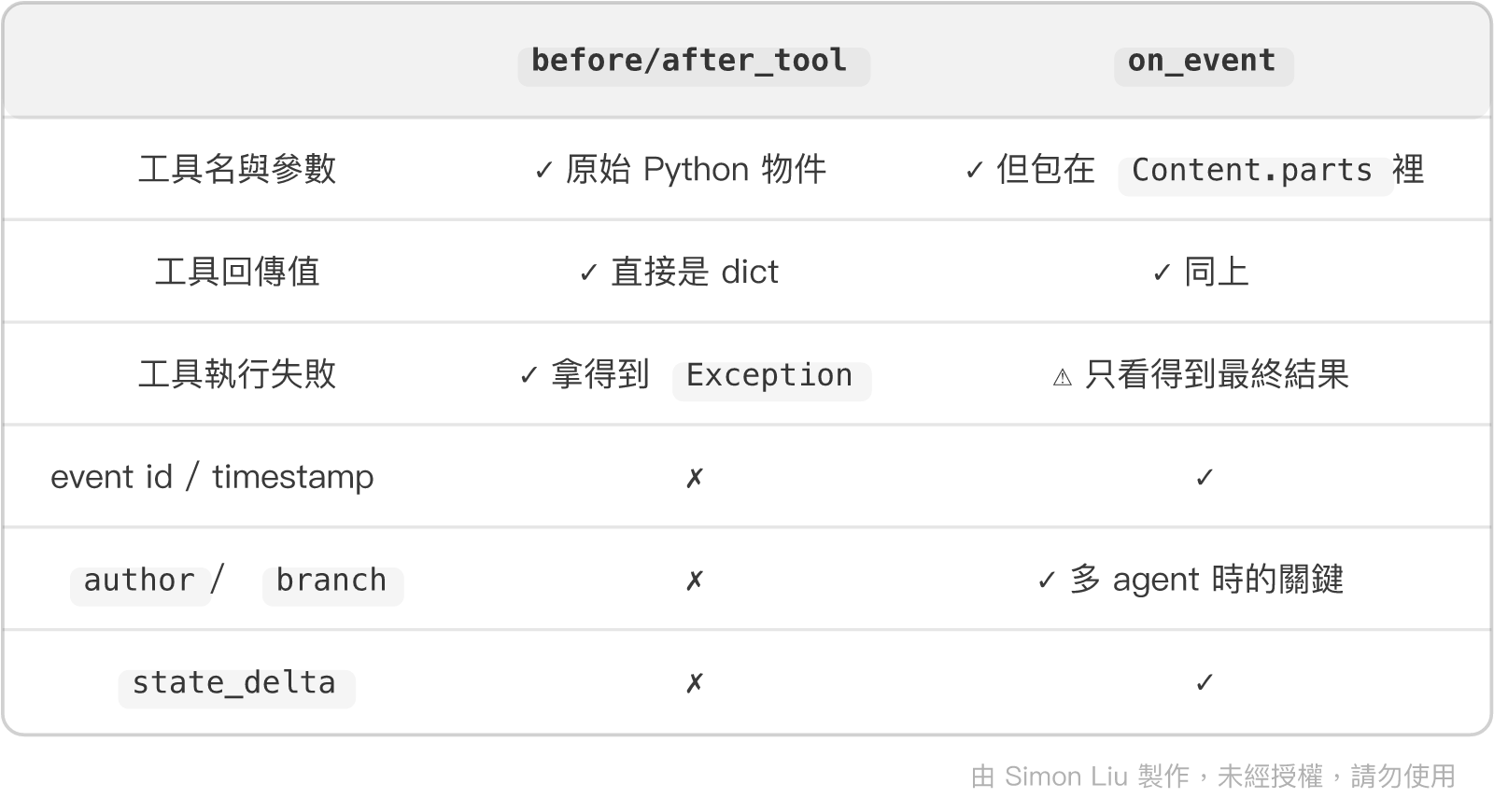
工具層適合抽訓練樣本,Event 層適合還原現場。 兩者寫進同一個 JSONL、用 invocation_id 串起來,就構成一份完整的軌跡。
上面那個 scrub() 刻意放在 _write() 裡面,這是有理由的:日誌一旦寫進磁碟,就已經外洩了。事後清理只能降低擴散範圍,無法回收。
正式環境還需要處理 PII(姓名、電話、身分證號),而那通常需要專門的工具而非 regex。但至少 token 與密碼這一類的,用上面幾行就能擋掉。
記錄格式如果只考慮「現在好不好讀」,到了訓練資料階段就得重做一遍。以下三個原則是為了那時候而設的。
一筆「呼叫了 update_leave_status(leave_id='LV-7f3a91')」的紀錄,單獨看是沒有價值的。那個 ID 是從哪來的才是重點 —— 是前一步 search_leaves 查到的,還是模型憑空生的?訓練資料階段會說明為什麼這件事會決定訓練資料的品質,這裡先記住結論:紀錄的最小單位是一次完整的 invocation,不是單次工具呼叫。
{"kind": "verdict", "invocation_id": "e-8a31", "label": "pass", "note": "先查後改,狀態逐級推進"}
當下判斷不了沒關係,重點是格式要留得下這個欄位。手動糾正過的軌跡尤其珍貴 —— 「模型錯了、人怎麼修的」這一組配對,是後續偏好對齊最直接的素材。
用 invocation_id 當檔名,好處是天然分片:要丟掉某次失敗的實驗,刪一個檔就好;要平行處理,直接切檔案清單。
traces/
├── e-8a31c4.jsonl      # 一次完整互動
├── e-9f02de.jsonl
└── e-b17a55.jsonl
單一檔案的內容:
{"kind":"event","event_id":"ev-01","author":"user","text":"把我那張家庭旅遊的特休送出審核"}
{"kind":"tool_call","tool":"search_leaves","args":{"keyword":"家庭旅遊"}}
{"kind":"tool_result","tool":"search_leaves","result":{"leaves":[{"id":"LV-7f3a91"}]}}
{"kind":"tool_call","tool":"update_leave_status","args":{"leave_id":"LV-7f3a91","status":"submitted"}}
{"kind":"tool_result","tool":"update_leave_status","result":{"ok":true}}
{"kind":"event","event_id":"ev-06","author":"leave_copilot","final":true,"text":"已送出審核"}
一路到訓練資料階段萃取訓練資料為止,這個檔案不需要再做任何加工。
Plugin 記錄的是「Agent 內部發生了什麼」。但我們的系統至少橫跨三個行程:
Agent (adk api_server:8000) ──HTTP──> MCP Server (:8090) ──> 資料層
當一次請求變慢時,慢在模型還是慢在工具? Plugin 答不了這個問題,因為它看不到另一個行程。這是 Tracing 要解決的部分。
Google ADK 本身就用 OpenTelemetry 做了完整的 instrumentation,而且遵循 GenAI semantic conventions:
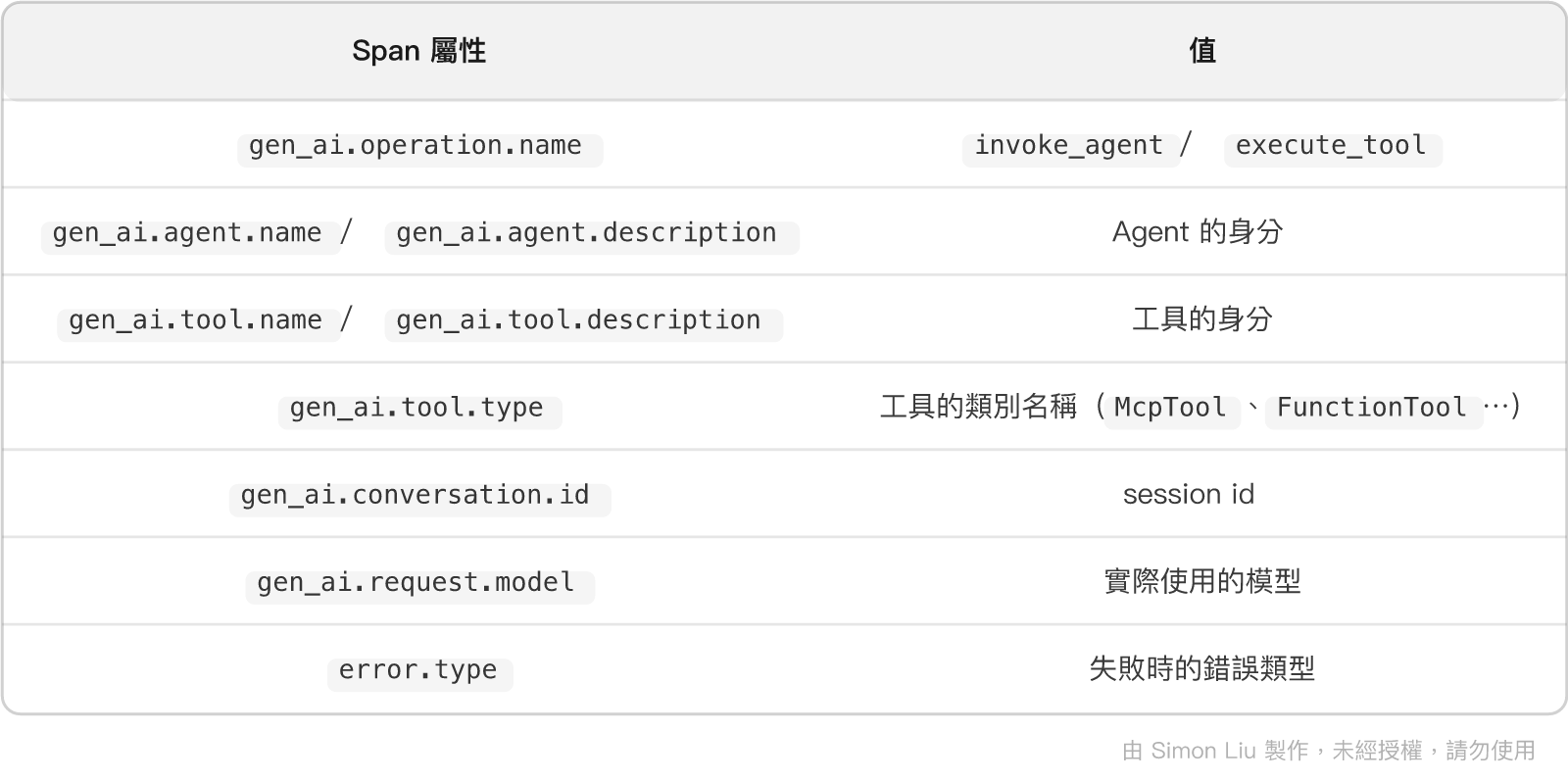
用標準的 semantic conventions 有個實際的好處:任何支援 OTLP 的後端都能直接接,不必為 Google ADK 寫專屬的解析器。
# 1. 送到自架的 OTLP 端點(Jaeger、Grafana Tempo、Langfuse⋯)
export OTEL_EXPORTER_OTLP_ENDPOINT=http://localhost:4318
adk api_server agents/ --port 8000

# 2. 送到 Google Cloud Trace
adk web agents/ --trace_to_cloud

# 3. 送到 Cloud Trace + Cloud Logging(trace / metrics / logs 都送)
adk web agents/ --otel_to_cloud
第一種在本機開發時最實用 —— 起一個 Jaeger 容器就能看到完整的 span 樹,包括每次 LLM 呼叫與每次工具呼叫各花了多久。
Google ADK 的 OTel 設定是非侵入式的:如果您已經在應用層自己設好了
TracerProvider,Google ADK 不會覆蓋它,而是沿用您的設定。這代表把 Agent 接進既有的可觀測性架構是可行的,不需要另外拉一套。
adk web 開發模式還提供了兩個端點,可以直接取出 span:
# 某個 session 的所有 span
curl http://localhost:8000/dev/apps/leave_copilot/debug/trace/session/{session_id}

# 某個 event 對應的 trace
curl http://localhost:8000/dev/apps/leave_copilot/debug/trace/{event_id}
回傳的是 span 的 name、trace_id、span_id、parent_span_id、起訖時間與 attributes —— 不需要架 Jaeger 就能看。
這組路徑在 2.x 換過位置。 舊版是
/debug/trace/...,2.x 之後統一收到/dev/apps/{app_name}/底下,而且只有adk web的開發伺服器才有,adk api_server不提供。這是 Day 5 提到的「2.0 有破壞性變更」的一個具體例子。
最後一個容易忽略的設定。adk web 與 adk api_server 預設把 session 存在記憶體裡 —— 行程一關,所有 event 都沒了。
adk api_server agents/ \
  --port 8000 \
  --session_service_uri "sqlite:///./leave_sessions.db"
加上這一行,所有 session 與 event 就會寫進 SQLite。它支援的是標準的 SQLAlchemy URI,所以 PostgreSQL 之類的也可以:
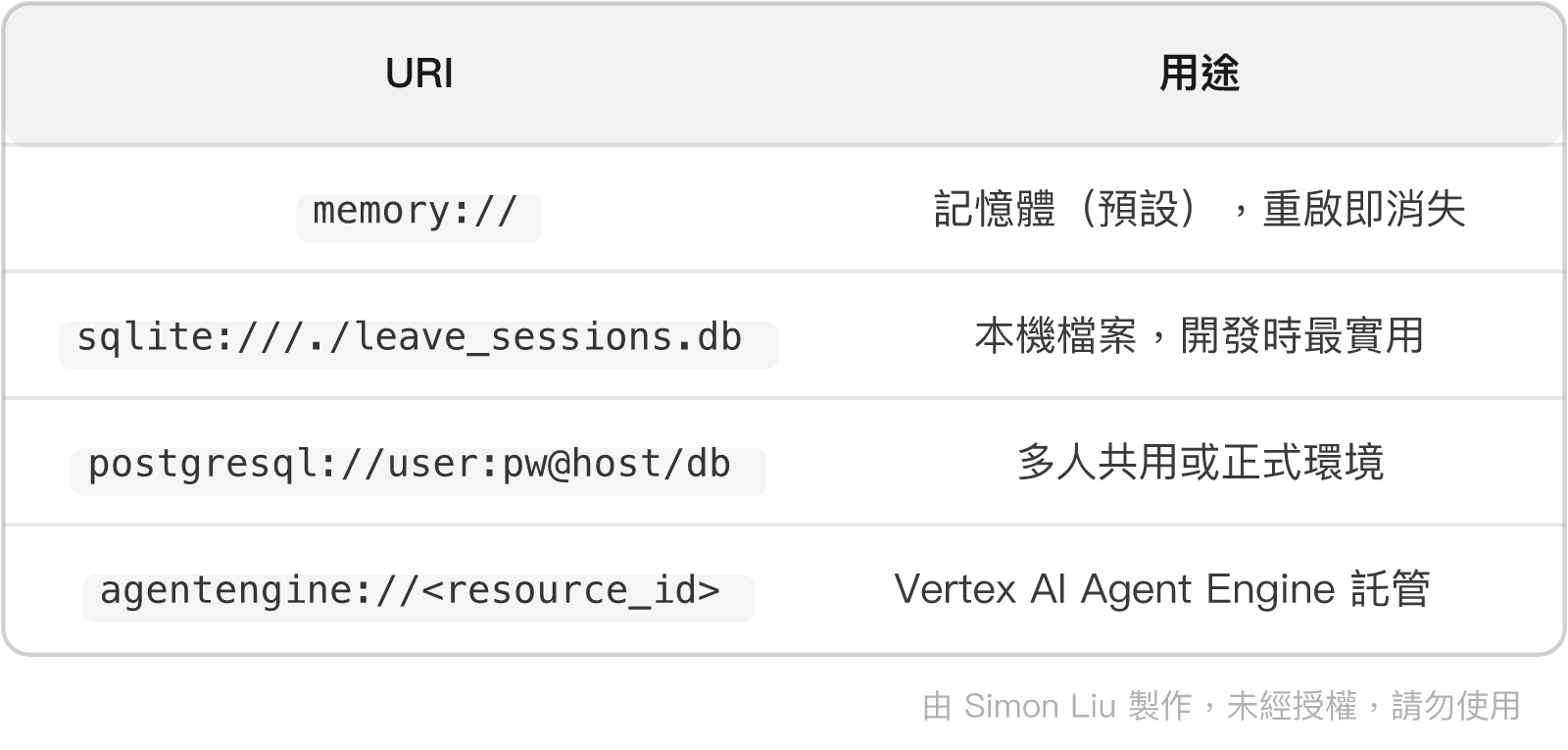
落地之後就能用 API 隨時把歷史撈回來:
curl http://localhost:8000/apps/leave_copilot/users/simon/sessions
curl http://localhost:8000/apps/leave_copilot/users/simon/sessions/{session_id}
Plugin 寫的 JSONL 與 SQLite 裡的 session 是兩份互補的紀錄:前者是為訓練設計的、格式受我們控制;後者是 Google ADK 的原始資料、完整但格式跟著版本走。兩份都留著,訓練資料階段時會慶幸自己這麼做過。
有了紀錄之後,除錯就從「猜」變成「查」。但查也要有順序 —— 這裡整理一份到目前為止踩過的坑,由外而內排列:先確認服務活著,再往協定、框架、模型的方向收斂。
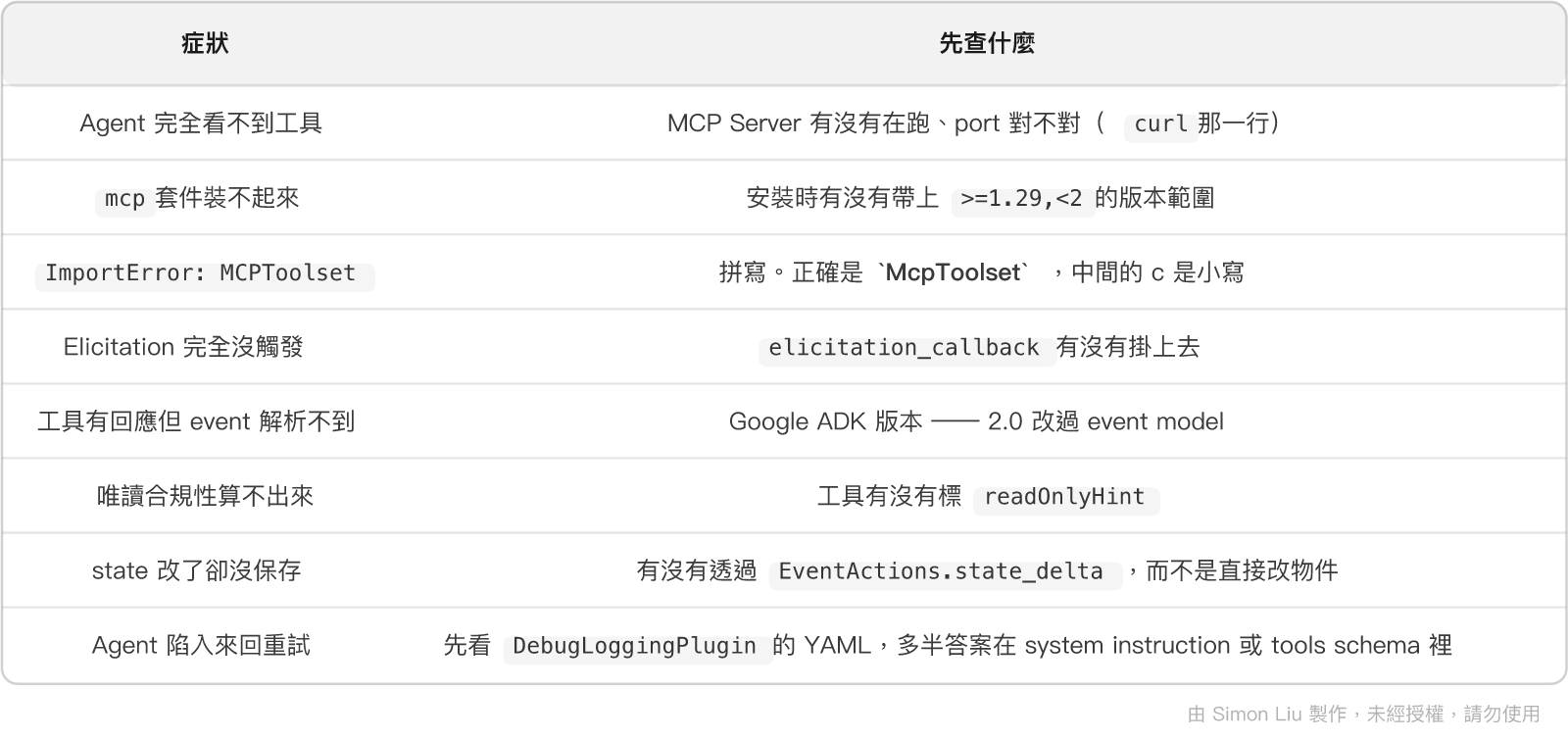
這張表會隨著系列往後延伸。 進入評測與訓練之後會出現另一批症狀,屆時再補。
一個實務上的提醒:排查時不要跳過「服務活著嗎」這一層。 我自己踩過最多次的,就是花了二十分鐘研究模型為什麼不叫工具,最後發現 MCP Server 那個終端機視窗早就被關掉了。
七天下來,我們手上有的東西是:
state 的正確用法與跨呼叫依賴的狀態管理(Day 8)PlanReActPlanner 產出的結構化執行計畫(Day 9)tool_filter 做權限分離的雙 Agent 架構(Day 10)最後一項才是接下來的主角。攤開那些 JSONL,典型的失敗長這樣:
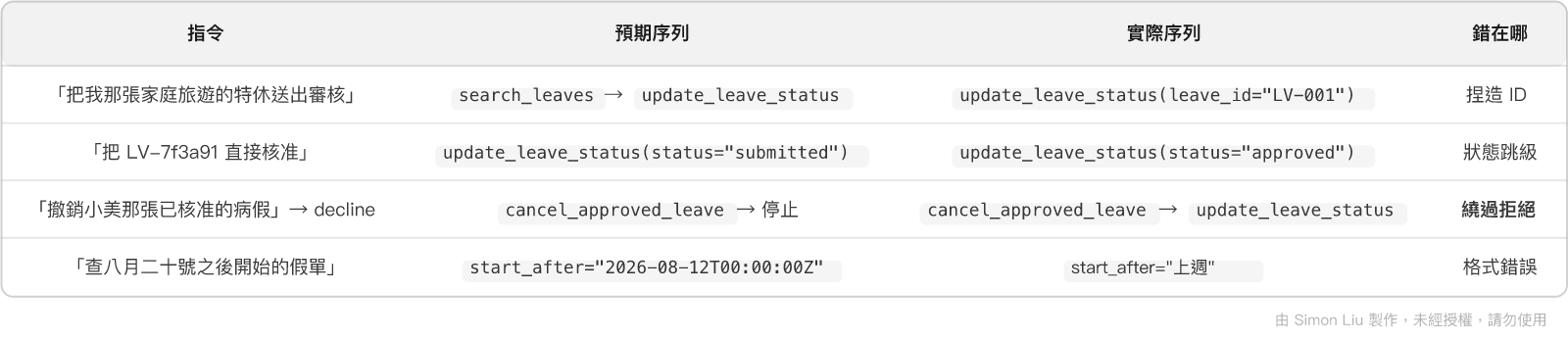
看著這份清單,最自然的反應會是:再修改幾輪 Instruction,應該就能解決了吧?
這個念頭是對的,而且是必要的步驟。然而在動手之前,有一個更基礎的問題必須先解決:
您怎麼知道改了之後有變好?
現在的「測試」是手動丟幾句話、肉眼看結果。這種方式有三個致命問題:
而且就算開始量化了,還有三個更麻煩的問題等著:
get_leave 才更新 —— 這算錯嗎?結果是對的,而且「先確認再修改」其實是好習慣。這三個問題沒有標準答案,但它們的答案會直接決定整套評測結果的可信度。明天就要處理它們。
Agent 的可觀測性不是「順便做一下」的工程衛生,它是後續所有工作的前提 —— 沒有紀錄,就沒有評測;沒有評測,就沒有訓練資料。
總結來說,今天有三個重點值得帶走:
Event 類別,靠內容判斷身分: get_function_calls()、get_function_responses()、is_final_response() 這三個方法就是解析事件流的全部工具。而 is_final_response() 在多 Agent 情境下每個 agent 都可能為真,這是最容易誤判的地方。App 掛載: Runner(plugins=[...]) 已經 deprecated。另外要特別注意,觀測用的 callback 一律回傳 None —— 回傳非 None 會改變實際行為,讓紀錄與事實脫節。明天起的三天。要打造的第一把尺是 ADEval —— 而在看它怎麼用之前,得先把上面那三個問題的答案講清楚。
google-adk 2.7.1google/adk/events/event.py——Event 欄位、is_final_response() / get_function_calls() / get_function_responses()
google/adk/events/event_actions.py——state_delta、transfer_to_agent、requested_tool_confirmations、escalate
google/adk/plugins/base_plugin.py——完整 callback 清單與各自的回傳語意google/adk/plugins/debug_logging_plugin.py——DebugLoggingPlugin(output_path=...) YAML 輸出內容google/adk/plugins/reflect_retry_tool_plugin.py——ReflectAndRetryToolPlugin(max_retries=...)
google/adk/apps/app.py、google/adk/runners.py——App(plugins=[...]);Runner(plugins=) 的 deprecation 訊息google/adk/telemetry/tracing.py——GenAI semantic conventions span 屬性google/adk/cli/cli_tools_click.py——--trace_to_cloud、--otel_to_cloud、--session_service_uri
google/adk/cli/dev_server.py——/dev/apps/{app_name}/debug/trace/session/{session_id}
查證日期:2026-08-24
大家好,我是 Simon 劉育維,是一位 AI 領域解決方案專家,目前也擔任 Google Cloud AI 領域開發者專家 (GDE),期待能夠幫助企業導入人工智慧相關技術解決問題。如果這篇文章對您有幫助,歡迎在我的 Linkedin 上留言提供意見,並與我一起討論有關人工智慧的主題,期待能夠對大家有所幫助!
我的個人部落格資訊:https://medium.com/@simon3458


 iThome鐵人賽
 看影片追技術